Fan-Made Survival Wiki · Roblox

Clean the Backrooms Wiki

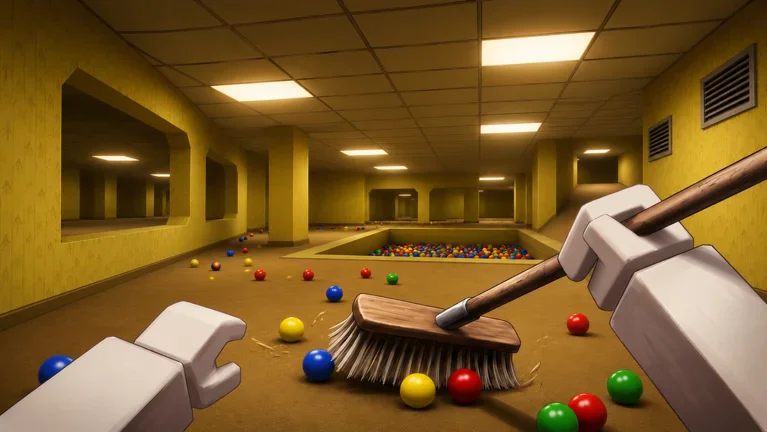
Clean the Backrooms is a Roblox survival game where you clean the Backrooms, earn Money, upgrade your equipment, unlock rooms, and escape what hunts you when the lights go out.

4.1KPlaying now
2.4M+Total visits
51.3KFavorites
83%Rating
Clean the Backrooms Wiki
Beginner Guide

Clean the Backrooms Beginner Guide

1

Map the starting room

Before collecting anything, locate the Ball Pit or Ball Feed, main door, nearby side routes, and closest Safe Room. Turn around once to memorize your return path, then identify hazards such as Balloons. Begin with a short sweep near safety instead of rushing deeper, because every successful run depends on knowing where to submit Balls and retreat.

  • Locate the submission point and Safe Room.
  • Avoid Balloons and suspicious environmental hazards.
  • Memorize the safest return route.
2

Collect and bank Balls

Use the Vacuum Cleaner to gather nearby Balls while staying close to your confirmed route. When the Backpack becomes full or the route edge feels unfamiliar, return to the Ball Pit or Ball Feed and submit everything. Banking converts collected Balls into cleaning progress and Money, preventing a dangerous deep trip from carrying unsubmitted progress.

  • Make short collection trips.
  • Submit Balls before exploring farther.
  • Confirm progress and Money after banking.
3

Upgrade before going deeper

Spend Money from submitted Balls on equipment improvements that reduce future travel or collection time. Speed and Backpack capacity are practical early priorities, but check the current shop panel for exact prices and effects. After purchasing an upgrade, remap the next door, submission route, and Safe Room path before entering a new room.

  • Prioritize movement or Backpack improvements.
  • Check current prices in the shop.
  • Never enter deeper areas with unsubmitted Balls.
4

Finish rooms and search Keys

Repeat the collect-and-submit pattern by clearing one small zone at a time. If cleaning progress stalls, inspect corners, side rooms, and alternate routes rather than repeating one corridor. Once the area is safe enough, search accessible spaces for Keys. Cleaning percentage alone does not unlock the exit, which may require four Keys distributed across rooms.

  • Search side spaces when progress stops.
  • Keep the return route available.
  • Look for Keys after establishing safety.
5

Retreat when danger appears

Stop vacuuming immediately if the lights go out, a Monster appears, or an Anomaly blocks your path. Abandon an unsubmitted load if necessary and follow the confirmed route to the Safe Room. Surviving matters more than maximizing one trip. After danger passes, bank progress, buy useful upgrades, and continue cleaning or searching for Keys.

  • Treat lights going out as danger.
  • Never touch Balloons.
  • Retreat before attempting another run.
Codes tracker

Clean The Backrooms Codes

Latest collection
Current Status

No Codes Released Yet

Clean the Backrooms has not started a code campaign yet. The developer has not published redeemable codes so far, and this page becomes the first place they appear the moment that changes.

Official Sources

Where Codes Will Drop

Future codes arrive through official channels: the Clean the Backrooms Roblox game page and developer community posts. Check back after every major update and event.

Step By Step

How To Redeem Codes

Once codes go live, open Clean the Backrooms, find the codes button in the game menu, type the code exactly as shown, and your reward lands on your account instantly.

Cleaning Route

Clean The Backrooms Cleaning Route

1

Map the room before collecting

Enter the cleaning area and pause to locate Ball piles, the indicated Ball Pit, Ball Feed, or ventilation route, nearby doors, and the Safe Room direction. Read the active objective before picking anything up, especially when several facilities are visible. Planning the destination first prevents full Backpack loads from being carried to the wrong opening.

  • Locate the indicated delivery target.
  • Note nearby doors and Safe Room routes.
2

Choose tools and control each load

Use a Broom or basic pickup for nearby Balls, a Vacuum when repeated collection slows a larger room, or a Leaf blower to control scattered groups. Collect a controlled Backpack load without wandering into unexplored corridors. Keep the route clear so you can retreat if lighting changes, an anomaly appears, or a Monster interrupts the cleaning process.

  • Match the tool to the current delay.
  • Avoid risky detours for extra Balls.
3

Deliver and confirm room progress

Carry each load to the room-indicated Ball Pit, Ball Feed, or ventilation route, then face the interaction point and activate the prompt. Check the visible progress response after every submission. If nothing changes, stop repeating the same delivery and verify the target, interaction angle, and possibility of another required facility before collecting another load.

  • Submit Balls at the indicated destination.
  • Confirm progress before repeating the route.
4

Finish cleaning before searching

Repeat the shortest safe collection-and-delivery trip until the relevant target or ventilation task confirms completion. Only then inspect newly accessible spaces for keys, doors, anomalies, or the next route. Locked exits may require four keys hidden around areas such as party rooms, bedrooms, Ball piles, or manholes, so continue searching after cleaning rather than assuming one key completes the route.

  • Search only after cleaning progress confirms completion.
  • Check likely hiding places for required keys.
5

Retreat when danger changes the plan

Stop collecting when an anomaly, darkness, or Monster makes the route unsafe, and move toward the Safe Room instead of attempting one final load. Resume only after the danger has passed and the delivery route is clear. If repeated trips are the main delay, spend Money on Backpack capacity, collection, or movement improvements that shorten the route.

  • Prioritize safety over one last Ball.
  • Upgrade the bottleneck affecting repeated trips.
Key Guide

Clean The Backrooms Keys

KeyPurposeObtainCondition
Waiting Area KeyOpens cleaning areasBuy in shopCheck current price
Room Door KeysOpen later areasBuy matching keyNeed enough cash
Hallway KeyAdvances escape routeSearch hallway areaComplete area progression
Room F KeyAdvances escape routeSearch Room FReach Room F
Atrium KeyAdvances exit progressSearch the AtriumOpen connected area
Fourth Escape KeySatisfies escape objectiveFollow current objectiveCheck current version
Upgrades

Clean The Backrooms Upgrades

UpgradeRoleBenefit
VacuumBall collectionClear rooms
BackpackCarry capacityReduce returns
Movement SpeedTravel speedEscape danger
Money BonusMoney earningsBuild currency
Dumping SpeedDeposit timeShorten vulnerability
Scoop GripBall collectionFewer actions
FlashlightDark visibilitySupport navigation
Extra SkillRun benefitSituational advantage
Monster Guide

Clean The Backrooms Monsters

Core monster

Smiler

Smiler is associated with dark areas, making visibility and a clearly lighted retreat route important during cleaning in unfamiliar rooms.

  • Keep the way back visible.
  • Leave dark areas when visibility becomes unreliable.
Chase threat

Hound

Hound is a chase-style threat that can attack during exploration, so audio or visual warnings should trigger an immediate retreat.

  • React quickly to warning signs.
  • Retreat before crossing more exposed open space.
Lurking threat

Lurker

Lurker makes room-by-room cleaning riskier, requiring shorter scouting sections and an open route toward the Safe Room.

  • Scout rooms in short sections.
  • Keep the Safe Room route open.
Reported entity

Root Creature

Root creature is a video-reported blackout encounter rather than a confirmed formal monster name or documented mechanical profile.

  • Treat the name as an encounter hint.
  • Follow the standard blackout escape response.
Environmental hazard

Balloon

Balloons are environmental anomalies whose contact removes one Life, making route planning safer than forcing a direct shortcut.

  • Walk around balloons while cleaning.
  • Never touch them to clear paths.
Danger phase

Blackout

A blackout darkens the area and makes threats harder to read, so stop collecting and prioritize a known safe position.

  • Stop collecting when the lights fail.
  • Move toward a known safe position.
Emergency shelter

Locker

A Locker provides immediate defensive shelter when a nearby monster makes crossing open space unsafe, but it does not guarantee a reset.

  • Use it when immediate movement exposes you.
  • Leave through the safest known direction.
Regrouping shelter

Safe Room

The Safe Room supports regrouping and ending an exposed run when its route remains reachable without creating greater danger.

  • Use it when the route remains clear.
  • Regroup there after blackout danger.
Map Areas

Clean The Backrooms Maps

Starting Route

Ball Pit and Starter Playrooms

The starting area provides nearby Balls, a short return loop, and the first practical route for building Cash before opening further gates.

  • Collect nearby Balls before traveling deeper.
  • Learn the short return route early.
  • Avoid crowding around the Ball Pit.
Early Gate

Waiting Area

Waiting Area functions as an early expansion and progression test, but its reported price around 10 Cash requires confirmation through the current shop panel.

  • Check the current shop panel first.
  • Confirm the gate opens your intended room.
  • Treat the reported price as changeable value.
Water Room

Poolrooms

Poolrooms offer open sections and distinctive water-themed landmarks, while reflective or repeated surfaces can make Balls and exits harder to read.

  • Sweep open sections in manageable loops.
  • Remember landmarks before returning through reflections.
  • Keep a clear route back.
Open Area

Atrium

Atrium provides a large open area, but its center can expose players and create longer trips between Ball collection and a safe return.

  • Scout Ball Pit distance before filling.
  • Avoid assuming larger areas improve farming.
  • Use the exposed crossing as a remembered retreat landmark.
Party Wing

Party Room and Playrooms

The Party Room or Playrooms wing works best when divided into smaller sections, because decorations may hide route landmarks during Lights Out.

  • Divide scattered targets into smaller sections.
  • Use strong route landmarks during blackouts.
  • Avoid chasing every visible Ball.
Route Planning

Ball Pits and Retreats

Efficient map routes end at a Ball Pit with a full Backpack and known way back, making density, distance, and safety more important than room size.

  • Compare Ball density before choosing routes.
  • Remember entrances and known retreat points.
  • Prefer compact loops ending at Pits.
Key Systems

Gates and Ending Keys

Normal progression uses Cash for shop gate access, while Hallway, Room F, and Atrium Keys belong to a separately described ending route.

  • Read the current gate prompt carefully.
  • Separate shop keys from ending keys.
  • Name rooms clearly during multiplayer callouts.
Blackout Risk

Maps during Lights Out

Lights Out changes navigation across Poolrooms, Atrium, and Party Room, so survival depends on safe landmarks, known routes, and timely regrouping.

  • Remember a Safe Room before exploring.
  • Abandon risky sweeps when Monsters appear.
  • Regroup instead of splitting through branches.
Update Checks

Clean The Backrooms Update Checks

Clean the Backrooms FAQ

Find out how cleaning, progression, keys, upgrades, survival, and current codes work before starting a run.

What do you do in Clean the Backrooms?

You explore Backrooms areas, vacuum up scattered balls, and deposit them into the required ball pits or feeds to clear rooms. Completing objectives earns Money and opens routes toward additional rooms and the exit.

How should a new player start a cleaning run?

Enter an available room, collect balls with the vacuum, and return to the appropriate pit when your backpack is full. Repeat the collection and deposit cycle while watching the room's completion percentage and nearby threats.

How do you earn Money and improve your equipment?

Depositing collected balls generates Money, which you can spend in the shop. Prioritize upgrades to the vacuum, backpack capacity, movement speed, and money-per-ball bonuses to clean faster, carry more, and improve later runs.

How do keys help you reach the exit?

Search cleared rooms and connected areas for collectible keys because locked doors and exits can require a specific key or four keys. Finish the required ball objectives and collect the needed keys before attempting to leave.

How do you survive monsters and anomalies?

Avoid balloons and other anomalies, and retreat or hide in a safe room when a monster appears. Touching hazards or being caught can cost a life, so use rooms, routes, and safe areas to wait out danger.

Are there any current Clean the Backrooms codes?

The current supplied codes record lists no active or newly discovered codes. Check the codes status again when the game or its reward information changes rather than relying on unverified code lists.